Please note that our Terms & Conditions and Privacy Notice are applicable.
On Promotion in Automotive Vehicles
Some search tips we've found useful:
- Check the spelling of your search terms
- Use fewer or more general search terms
- Try browsing a category related to your search terms
Ads in other locations
10
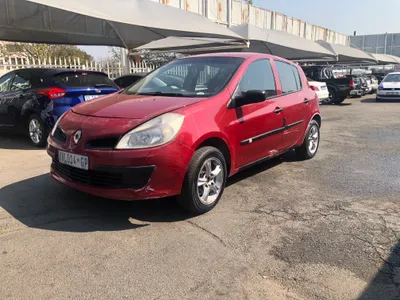
R 85,000
NEGOTIABLE
SavedSave
2010125,000km
2010125,000km12
3d
VERIFIED
9
2y
Capital Pawn
2
Contact f/price
SavedSave
RENAULT CLIO 3,SANDERO,LOGAN,NISSAN NP200 FRONT ABS SPEED SENSOR OEM in good condition Available for sale at CORNERSTONE AUTO SPARES. Find Us At No 432 Louis Botha Avenue Cnr Main Street Shop No 3, Rouxville, Highlands North. Jhb. ContactsCall/Whatsapp : 074 366 6060 - Tony Whatsapp : 071 554 4645 - CJTrading Hours/DaysMonday to Friday 8am to 5pmSaturdays 8am to 4pmSundays Closed
14d
Highlands North5
1mo
Randburg1
R 5,200
NEGOTIABLE
SavedSave
Digiprog3 OBD Version With OBD Cable ST01 ST04Digiprog 3 V4.94 Features:Service Interval Adjustments and SettingsAssyst processingFault memory read-eraseEEPROM programmerIntegrated PC communicationSome Important Tips for Using Digiprog 3:1. Always connect the Eeprom to the ST01 or ST04 before you connect to the DigiProg this will avoid Electro static feedback (ESD).2. Never solder the connections whilst the lead is connected to the programmer, this will damage the DigiProg.3. Always keep your DigiProg in its case when not in Use & keep it in a dry environment at night (do not leave it in the trunk of your car) If you are using solvents to remove lacquers' from Eeprom's ensure that they are cleaned4. completely as the solvent can damage the clips.Digiprog 3 Menu:1. EEPROM MenuThe first option on the main menu is the Eeprom menu. Reading, writing and saving Eeprom information is all done using this menu. A more detailed guide to using this menu follows later on in the introduction.2. CAR / TRUCK MenuThis is the menu you will use for correcting and reprogramming vehicles. Manufacturers are set out in alphabetical order and models of vehicles are set out in a simple sub-menu format.3. Motorcycle MenuThis menu is the same as the CAR / TRUCK menu but is used for reprogramming motorcycles.4. Special Functions MenuThe special functions menu is for use only by official DigiProg dealers.5. Setup MenuThis menu is where settings on your DigiProg can be changed. Language, password, brightness, volume, and the time / date can all be set and changed in this menu. You can also change whether your machine is working in kilometres or miles.Using the EEPROM Menu:On some of the vehicles you will come across, an eight pin Eeprom chip will be used to store the vehicle data. These chips hold vital information from the vehicle such as ignition and immobiliser codes. Loss of this information could result in anything from minor faults , to major faults involving the vehicle not starting and having to be taken to the main dealer. This is why it is very important to read and save the original information from the Eeprom before programming, this way if any errors do occur you can always return to the point you started.The process of reading and saving this information is very simple. The Eeprom chip itself will have a mask number printed across the top of it, for example a widely used chip is a 93C46. you can connect the chip to your DigiProg by using adaptor ST01 or ST04. Most chips are surface mount eeproms which will use ST01, but the larger DIL chips will use ST04.Package including:- 1pc x Main unit of Digiprog III- 1pc x OBD2 cable- 1pc x ST01 (01/2)cable- 1pc x ST04 (04/2)cable- 1pc x (01/4)adapte- 1pc x Power adapterFollow us on:Facebook: AutoleaderSAInstagram : AutoleaderSADelivery can be arranged
2d
Sandton1
R 5,200
NEGOTIABLE
SavedSave
Digiprog3 OBD Version With OBD Cable ST01 ST04Digiprog 3 V4.94 Features:Service Interval Adjustments and SettingsAssyst processingFault memory read-eraseEEPROM programmerIntegrated PC communicationSome Important Tips for Using Digiprog 3:1. Always connect the Eeprom to the ST01 or ST04 before you connect to the DigiProg this will avoid Electro static feedback (ESD).2. Never solder the connections whilst the lead is connected to the programmer, this will damage the DigiProg.3. Always keep your DigiProg in its case when not in Use & keep it in a dry environment at night (do not leave it in the trunk of your car) If you are using solvents to remove lacquers' from Eeprom's ensure that they are cleaned4. completely as the solvent can damage the clips.Digiprog 3 Menu:1. EEPROM MenuThe first option on the main menu is the Eeprom menu. Reading, writing and saving Eeprom information is all done using this menu. A more detailed guide to using this menu follows later on in the introduction.2. CAR / TRUCK MenuThis is the menu you will use for correcting and reprogramming vehicles. Manufacturers are set out in alphabetical order and models of vehicles are set out in a simple sub-menu format.3. Motorcycle MenuThis menu is the same as the CAR / TRUCK menu but is used for reprogramming motorcycles.4. Special Functions MenuThe special functions menu is for use only by official DigiProg dealers.5. Setup MenuThis menu is where settings on your DigiProg can be changed. Language, password, brightness, volume, and the time / date can all be set and changed in this menu. You can also change whether your machine is working in kilometres or miles.Using the EEPROM Menu:On some of the vehicles you will come across, an eight pin Eeprom chip will be used to store the vehicle data. These chips hold vital information from the vehicle such as ignition and immobiliser codes. Loss of this information could result in anything from minor faults , to major faults involving the vehicle not starting and having to be taken to the main dealer. This is why it is very important to read and save the original information from the Eeprom before programming, this way if any errors do occur you can always return to the point you started.The process of reading and saving this information is very simple. The Eeprom chip itself will have a mask number printed across the top of it, for example a widely used chip is a 93C46. you can connect the chip to your DigiProg by using adaptor ST01 or ST04. Most chips are surface mount eeproms which will use ST01, but the larger DIL chips will use ST04.Package including:- 1pc x Main unit of Digiprog III- 1pc x OBD2 cable- 1pc x ST01 (01/2)cable- 1pc x ST04 (04/2)cable- 1pc x (01/4)adapte- 1pc x Power adapterFollow us on:Facebook: AutoleaderSAInstagram : AutoleaderSADelivery can be arranged
1mo
Sandton2
R 550
NEGOTIABLE
SavedSave
Midrand MotorcyclesFairing bolt kits, all sizes included with fairing screw clips, rubber washes and allen key.Colors availableBlack, Silver, Gold, Blue, Green, Orange and Red.R550 per setView our full catalogue via WhatsApp using the below links:https://wa.me/c/27765741342We are based in Midrand, JohannesburgCourier available nationwide from R150For all enquiries contact 0/7/6/5/7/4/1/3
1mo
Midrand1
R 5,200
NEGOTIABLE
SavedSave
Digiprog3 OBD Version With OBD Cable ST01 ST04Digiprog 3 V4.94 Features:Service Interval Adjustments and SettingsAssyst processingFault memory read-eraseEEPROM programmerIntegrated PC communicationSome Important Tips for Using Digiprog 3:1. Always connect the Eeprom to the ST01 or ST04 before you connect to the DigiProg this will avoid Electro static feedback (ESD).2. Never solder the connections whilst the lead is connected to the programmer, this will damage the DigiProg.3. Always keep your DigiProg in its case when not in Use & keep it in a dry environment at night (do not leave it in the trunk of your car) If you are using solvents to remove lacquers' from Eeprom's ensure that they are cleaned4. completely as the solvent can damage the clips.Digiprog 3 Menu:1. EEPROM MenuThe first option on the main menu is the Eeprom menu. Reading, writing and saving Eeprom information is all done using this menu. A more detailed guide to using this menu follows later on in the introduction.2. CAR / TRUCK MenuThis is the menu you will use for correcting and reprogramming vehicles. Manufacturers are set out in alphabetical order and models of vehicles are set out in a simple sub-menu format.3. Motorcycle MenuThis menu is the same as the CAR / TRUCK menu but is used for reprogramming motorcycles.4. Special Functions MenuThe special functions menu is for use only by official DigiProg dealers.5. Setup MenuThis menu is where settings on your DigiProg can be changed. Language, password, brightness, volume, and the time / date can all be set and changed in this menu. You can also change whether your machine is working in kilometres or miles.Using the EEPROM Menu:On some of the vehicles you will come across, an eight pin Eeprom chip will be used to store the vehicle data. These chips hold vital information from the vehicle such as ignition and immobiliser codes. Loss of this information could result in anything from minor faults , to major faults involving the vehicle not starting and having to be taken to the main dealer. This is why it is very important to read and save the original information from the Eeprom before programming, this way if any errors do occur you can always return to the point you started.The process of reading and saving this information is very simple. The Eeprom chip itself will have a mask number printed across the top of it, for example a widely used chip is a 93C46. you can connect the chip to your DigiProg by using adaptor ST01 or ST04. Most chips are surface mount eeproms which will use ST01, but the larger DIL chips will use ST04.Package including:- 1pc x Main unit of Digiprog III- 1pc x OBD2 cable- 1pc x ST01 (01/2)cable- 1pc x ST04 (04/2)cable- 1pc x (01/4)adapte- 1pc x Power adapterFollow us on:Facebook: AutoleaderSAInstagram : AutoleaderSADelivery can be arranged
2mo
Sandton2
Contact f/price
SavedSave
RENAULT CLIO 4 LEFT SIDE HEADLIGHT OEM in good condition Available for sale at CORNERSTONE AUTO SPARES. Find Us At No 432 Louis Botha Avenue Cnr Main Street Shop No 3, Rouxville, Highlands North. Jhb. ContactsCall/Whatsapp : 074 366 6060 - Tony Whatsapp : 071 554 4645 - CJTrading Hours/DaysMonday to Friday 8am to 5pmSaturdays 8am to 4pmSundays Closed
4mo
Highlands North1
Contact f/price
SavedSave
RENAULT CLIO 15 INCH WHEEL CAPS OEM in good condition Available for sale at CORNERSTONE AUTO SPARES. Find Us At No 432 Louis Botha Avenue Cnr Main Street Shop No 3, Rouxville, Highlands North. Jhb. ContactsCall/Whatsapp : 074 366 6060 - Tony Whatsapp : 071 554 4645 - CJTrading Hours/DaysMonday to Friday 8am to 5pmSaturdays 8am to 4pmSundays Closed
4mo
Highlands North2
Contact f/price
SavedSave
RENAULT CLIO 4 FRONT STIFFENER OEM in good condition Available for sale at CORNERSTONE AUTO SPARES. Find Us At No 432 Louis Botha Avenue Cnr Main Street Shop No 3, Rouxville, Highlands North. Jhb. ContactsCall/Whatsapp : 074 366 6060 - Tony Whatsapp : 071 554 4645 - CJTrading Hours/DaysMonday to Friday 8am to 5pmSaturdays 8am to 4pmSundays Closed
4mo
Highlands North2
Contact f/price
SavedSave
RENAULT CLIO 4 WATER RADIATOR OEM in good condition Available for sale at CORNERSTONE AUTO SPARES. Find Us At No 432 Louis Botha Avenue Cnr Main Street Shop No 3, Rouxville, Highlands North. Jhb. ContactsCall/Whatsapp : 074 366 6060 - Tony Whatsapp : 071 554 4645 - CJTrading Hours/DaysMonday to Friday 8am to 5pmSaturdays 8am to 4pmSundays Closed
4mo
Highlands North2
Contact f/price
SavedSave
Various electronic control modules in stock – call us with
your part number.
Fully tested. 3 months warranty. Programming done in-house,
if applicable.
We are reachable on:
·
Cell – 073 537 4980 / 078 625 9687
(WhatsApp messages enabled).
·
Tel - 011 708 0142 / 011 615 0005.
We are based at:
Randburg Branch
1 Electron Close
Kya Sand
Randburg
2164
Bedfordview Branch
2 Watsonia Rd
Wychwood
Germiston
1401
13d
3
Contact f/price
SavedSave
Various electronic control modules in stock – call us with
your part number.
Fully tested. 3 months warranty. Programming done in-house,
if applicable.
We are reachable on:
·
Cell – 073 537 4980 / 078 625 9687
(WhatsApp messages enabled).
·
Tel - 011 708 0142 / 011 615 0005.
We are based at:
Randburg Branch
1 Electron Close
Kya Sand
Randburg
2164
Bedfordview Branch
2 Watsonia Rd
Wychwood
Germiston
1401
13d
2
Contact f/price
SavedSave
Various electronic control modules in stock – call us with
your part number.
Fully tested. 3 months warranty. Programming done in-house,
if applicable.
We are reachable on:
·
Cell – 073 537 4980 / 078 625 9687
(WhatsApp messages enabled).
·
Tel - 011 708 0142 / 011 615 0005.
We are based at:
Randburg Branch
1 Electron Close
Kya Sand
Randburg
2164
Bedfordview Branch
2 Watsonia Rd
Wychwood
Germiston
1401
13d
3
Contact f/price
SavedSave
Various electronic control modules in stock – call us with
your part number.
Fully tested. 3 months warranty. Programming done in-house,
if applicable.
We are reachable on:
·
Cell – 073 537 4980 / 078 625 9687
(WhatsApp messages enabled).
·
Tel - 011 708 0142 / 011 615 0005.
We are based at:
Randburg Branch
1 Electron Close
Kya Sand
Randburg
2164
Bedfordview Branch
2 Watsonia Rd
Wychwood
Germiston
1401
13d
3
Contact f/price
SavedSave
Various electronic control modules in stock – call us with
your part number.
Fully tested. 3 months warranty. Programming done in-house,
if applicable.
We are reachable on:
·
Cell – 073 537 4980 / 078 625 9687
(WhatsApp messages enabled).
·
Tel - 011 708 0142 / 011 615 0005.
We are based at:
Randburg Branch
1 Electron Close
Kya Sand
Randburg
2164
Bedfordview Branch
2 Watsonia Rd
Wychwood
Germiston
1401
2mo
1
Contact f/price
SavedSave
Various electronic control modules in stock – call us with
your part number.
Fully tested. 3 months warranty. Programming done in-house,
if applicable.
We are reachable on:
·
Cell – 073 537 4980 / 078 625 9687
(WhatsApp messages enabled).
·
Tel - 011 708 0142 / 011 615 0005.
We are based at:
Randburg Branch
1 Electron Close
Kya Sand
Randburg
2164
Bedfordview Branch
2 Watsonia Rd
Wychwood
Germiston
1401
13d
3
Contact f/price
SavedSave
Various electronic control modules in stock – call us with
your part number.
Fully tested. 3 months warranty. Programming done in-house,
if applicable.
We are reachable on:
·
Cell – 073 537 4980 / 078 625 9687
(WhatsApp messages enabled).
·
Tel - 011 708 0142 / 011 615 0005.
We are based at:
Randburg Branch
1 Electron Close
Kya Sand
Randburg
2164
Bedfordview Branch
2 Watsonia Rd
Wychwood
Germiston
1401
13d
2
Contact f/price
SavedSave
Various electronic control modules in stock – call us with
your part number.
Fully tested. 3 months warranty. Programming done in-house,
if applicable.
We are reachable on:
·
Cell – 073 537 4980 / 078 625 9687
(WhatsApp messages enabled).
·
Tel - 011 708 0142 / 011 615 0005.
We are based at:
Randburg Branch
1 Electron Close
Kya Sand
Randburg
2164
Bedfordview Branch
2 Watsonia Rd
Wychwood
Germiston
1401
8d
Successfully Added to List
View and manage your saved ads in your account.